


Terms of Use
 Share
ShareCopyright
The copyright of any and all of the data, information and materials included in the UACJ website (hereinafter referred to as “our website”) shall belong to UACJ Corporation. (hereinafter referred to as UACJ) unless otherwise specified herein.
Any visitor to our website may reproduce such data, information and/or materials included in our website under our copyright, provided that such reproduction is solely intended for a nonprofit purpose. The Copyright Law strictly prohibits such data, information and/or materials from being reproduced for a profit purpose. Any visitor to our website may reproduce such data, information and/or materials included in our website under our copyright, provided that such reproduction is solely intended for a nonprofit purpose. The Copyright Law strictly prohibits such data, information and/or materials from being reproduced for a profit purpose.
Disclaimer
UACJ does not necessarily give guarantee or warranty to the contents provided in our website. UACJ will take no responsibility for any error which may be included in such contents. The contents given herein are subject to change or abolition without notice.
The corporate and product names included in our website are the trademarks or registered trademarks of respective companies.
How to Use Our Website
Recommended Browsers
| PC | Microsoft Edge (latest version) Google Chrome (latest version) Mozilla Firefox (latest version) Safari (latest version) |
|---|---|
| Android | Default browser on the latest version of Android OS |
| iPhone | Default browser on the latest version of iOS |
| iPad | Default browser on the latest version of iPadOS |
- Browsers continuously add new functions and strengthen security through upgrades. Always keep your browser updated to the latest version.
Regarding Changing the Font Size
Please change the font size by referring to "How to change the font size in the accessibility tool" or "How to change the font size in your browser."
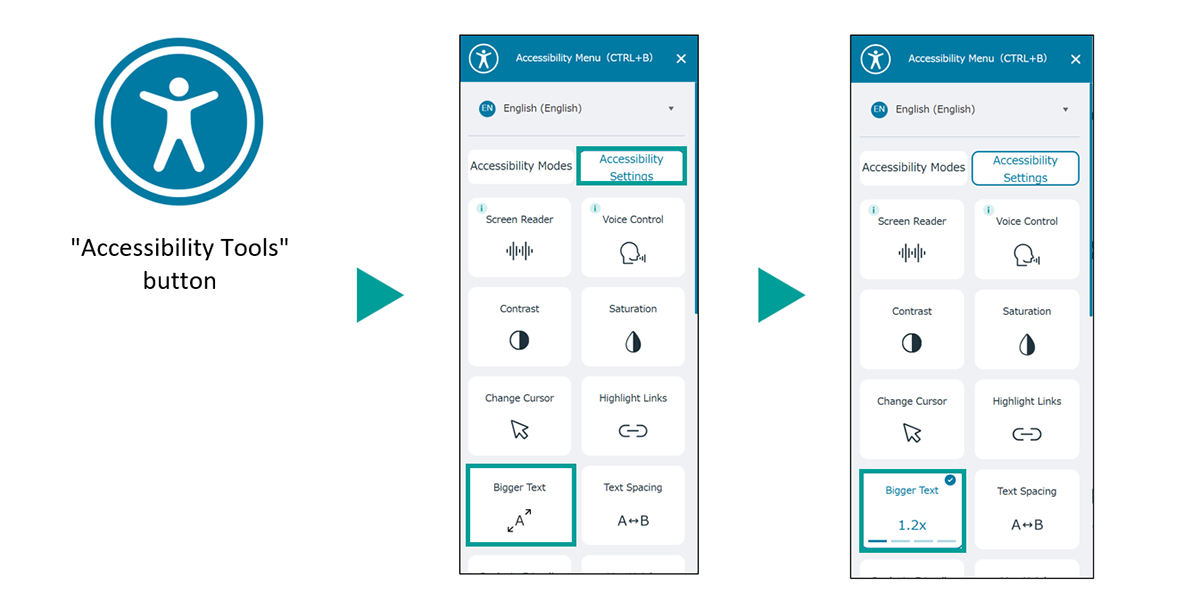
How to change the font size in the accessibility tool
Click the "Accessibility Tools" button at the bottom left of the screen.
Click the "Accessibility Settings" button in the menu. Then, click the "Bigger Text" button to enlarge the text for easier viewing.
How to change the font size in your browser
For Microsoft Edge, please click here.
Regarding print pages
Regarding printing methods
Please use your browser's print function to print.
How to use the browser's print function
For Microsoft Edge, please click here.
For Firefox, please click here.
Regarding breadcrumbs
The current page position is displayed in hierarchy. This is convenient for confirming the current location of the page or returning directly to a page in a higher layer.

Regarding various data

Links navigate to content within the site.

The linked page will open in a new window.

A PDF file will open.

A ZIP file will open.